This is the first post in a series of Insights that will showcase the functionality around storing and transmitting files in our platform and how it can streamline workflows, reduce friction and improve day‑to‑day business processes.
Concept
In EDP a Document could represent many things:
- A single document containing a single file, or multiple files for each different version and/or language.
- A text note with plain-text, HTML or both.
- An email.
- A container for communications transmitted by the system.
Items
Document Items represent the files that comprise a Document. In the case of:
- A single document, this will be the PDF, Word or image file the Document represents.
- A text note, this could be used for tracking credit control chases and their responses etc.
- An email, there would be an Item for each file attached to the email.
- A communication, it would contain an Item for each file transmitted.
Versioning and Languages
In the single document use case, you may have several individual files with the same content but in different languages. In the same vein, you may need to store multiple versions of the same file. In EDP, this can be combined to give you versioning across languages.
To keep things simple, the usage of this functionality is optional and only enabled if the Document is categorised as requiring it.
Linking to Business Data
Documents can be linked to any entities in your system that your configuration allows. You can create a Document directly from an entity, to which it will be automatically linked, or from the Documents Page and then link it yourself. You can even drop files onto entities to have a Document created and linked for you.

You can view the list of Documents linked an entity from its Menu, meaning they're only a single mouse-click away:
EDP ERP comes pre-configured to add additional sensible links. For example, if a Document was created and linked to a Sales Order it would automatically be linked to the Customer the Sales Order is for. This functionality can be tailored to your specific needs.
Companies
Partitioning data into Companies is natively supported in EDP. Documents are no different; a Document can exist within a single Company or belong to all of your Companies. If a Document is created from an entity it will be assigned to the same Company as that entity automatically.
Categories
All Documents are organised into Categories. Categories make Documents easier to locate using filtering but also define rules and functionality that are applied to the Documents within them. For example, a Category can be used to:
- Describe one or more sub-categories, known as Category Codes.
- Enable and optionally enforce the specification of a version and/or language on Document Items.
- Assert that the Document is linked to an entity of a specific type or limit the type of entity the Document can be linked to.
- Define the Categories that can be set on Document Items and optionally assert their specification.
User Access Controls
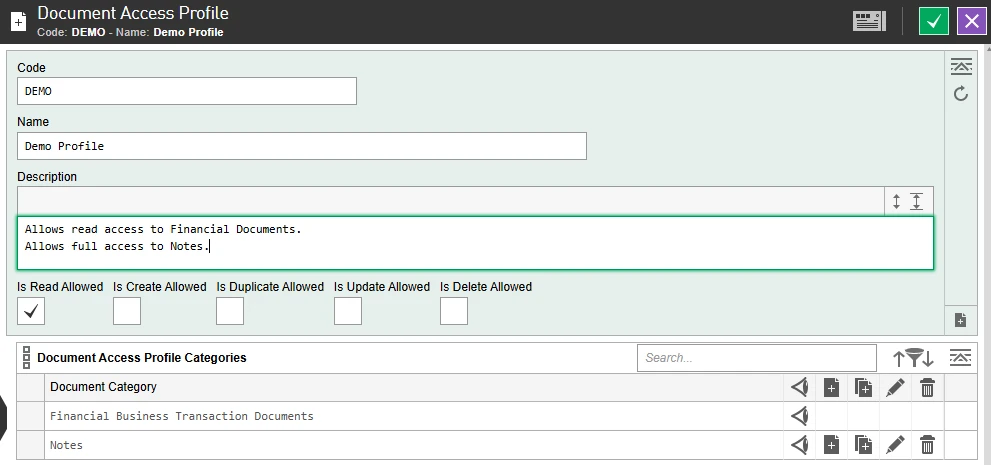
The complexities of securing data in EDP is simplified into Access Profiles for each area that requires it. The Document Access Profiles allow administrators to specify read, create, duplicate, update and delete permissions based on a Document’s Category.
Users can be assigned to one or more Document Access Profiles for individual Companies or for all Companies, meaning you can configure a user that can access sensitive Documents in one Company but not in another.
 The next post in this series explores some of the more advanced features of Documents.