EDP ERP delivers powerful multi‑organisation and multi‑company capabilities straight out of the box. It brings seamless centralised control across financial consolidation, shared data, and intercompany processes, while still giving each company the flexibility to tailor its own setup and operate with full autonomy.
Users & Login
Users can select the Companies they need to work with each time they log in.
Default Company assignments help streamline the login experience by pre‑selecting the most appropriate Company for each user. If no specific Companies are set or chosen by the user, the user is logged in with access to all authorised Companies.
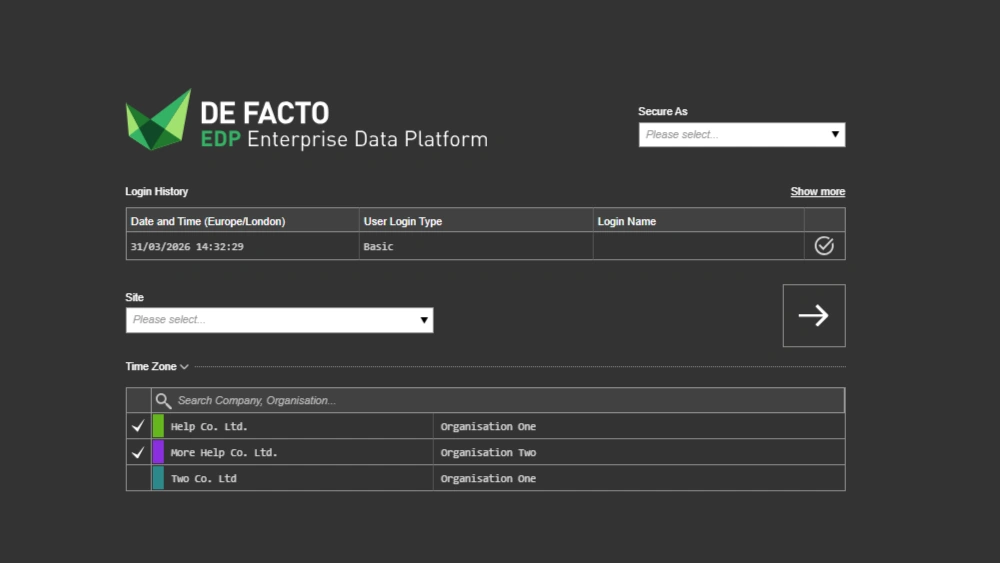 When a user logs in with specific Companies selected, they are restricted to viewing, creating, and editing data only within those Companies. Data belonging to any other Company remains inaccessible and fully protected throughout the session.
To clearly differentiate single-company sessions, a dedicated bar featuring the defined Company colour will appear beneath the header.

Transaction Entry
When creating Company specific data, such as transactions, only those Companies specified at login are available.

For single‑company sessions, the system streamlines the process even further by auto‑assigning the Company when the transaction is created.
Once a transaction is tied to a specific Company, the system restricts related entities, such as Customers or Suppliers, to only those applicable to that Company. This helps maintain accuracy and ensures a smooth, consistent experience across ERP.
Transaction Types, such as Sales or Purchase Orders, can be configured on a per‑company basis, allowing businesses to enable or restrict certain Transaction Types (e.g. preventing a holding Company from issuing invoices) or even certain functionality within a Transaction Type (e.g. only certain Companies may require Incoterms).
Security & SSRS
EDP’s robust user security allows user permissions to be configured independently for each Company. This allows multi-company users with differing responsibilities to have their security fine-tuned per company, per module, and even per field.
The SSRS (SQL Server Reporting Services) integration follows the same security rules, ensuring users only see reports and data for the Companies they are authorised to access.
Together, these features create a clear and controlled multi‑company environment. Organisations can centralise processes where it adds value, maintain separation where it’s needed, and give users exactly the access they require. The result is a flexible, secure, and scalable ERP platform designed to support complex group structures with confidence.